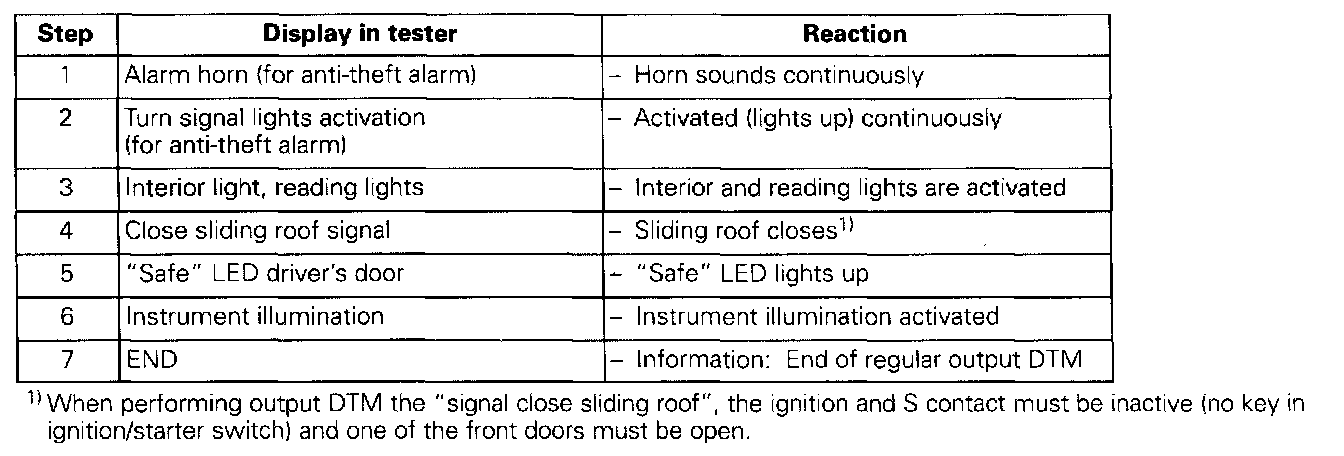
The components displayed in the output Diagnostic Test Mode (DTM) can differ depending upon the equipment installed to the vehicle. For example, on vehicles without an Anti-Theft Alarm there will be no step "1" as listed in the image below.
The output DTM activates the components in the order shown (see image):
Special tools and equipment
- VAG 1551 scan tool or VAG 1552 with cable VAG 1551/3
- Adapter set VAG 1594
- Voltage tester VAG 1527B
- Wiring diagram
Procedure
- Connect scan tool. VAG 1551 Scan Tool Connecting
- Initiate On Board Diagnostic (OBD). Initiating On Board Diagnostic Program
Indicated on display:
Rapid data transfer HELP
Select function XX
- Operate scan tool taking into account information on display:
- Press buttons -0- and -3- to select 'Output Diagnostic Test Mode" function 03.
- Switch ignition off and remove ignition key from ignition lock.
Indicated on display:
Rapid data transfer Q
03 - Output Diagnostic Test Mode
- Confirm entry with -Q- button.
Indicated on display:
Output Diagnostic Test Mode ->
Perform individual tests: See image above.
Output DTM can be terminated by pressing the "C" button.
- Press -> button.
If a component does not function:
- Continue output DTM to end.