Operating Electronics, Navigation Control Module
Special tools, testers and auxiliary items required
• Radio Removal Tool (T10057)
- If control module is replaced, select "Replacement" function for appropriate control module in "Guided Fault-Finding" routine using the Vehicle Diagnosis, Testing and Information System (VAS 5051).
- Switch off all electrical consumers.
- Remove the key.
Removing
- Place (T10057) - arrows - in release slits on Operating Electronics, Navigation Control Module (J402) until they engage. Points on grip eyes face outward.
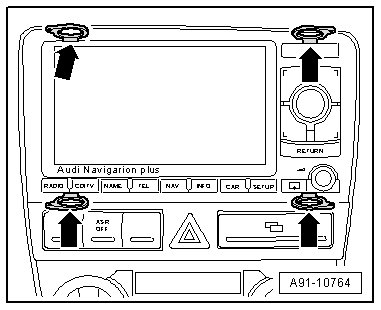
- Remove Operating Electronics, Navigation Control Module from instrument panel.
- Release connectors on Operating Electronics, Navigation Control Module and remove it.
- Remove (T10057) by pushing locking tabs on Operating Electronics, Navigation Control Module to do so.
Installing
- Connect all harness connectors.
- Slide Operating Electronics, Navigation Control Module straight into instrument panel until it engages in installation frame.