Navigation System with CD Drive Control Module
Special tools, testers and auxiliary items required
• Radio removal tool (T10057)
- Turn off all electrical components.
- Remove ignition key.
Removing
- Open left luggage compartment storage bin.
- Insert two clips on Radio Removal Tool (T10057 ) into release slits on Navigation System with CD Drive Control Module (J401) - 2 - until they engage. Points on grip eyes face outward.
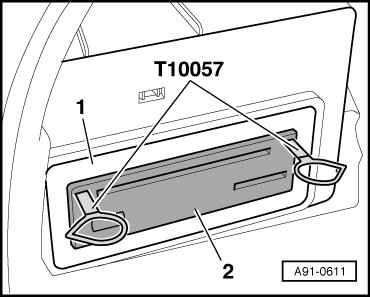
- Remove Navigation System with CD Drive Control Module (J401) - 2 - from installation frame - 1 -.
- Disconnect connectors on Navigation System with CD Drive Control Module (J401) - 2 -.
- Remove Radio Release Tool (T10057) by pressing locking tabs on Navigation System with CD Drive Control Module (J401).
Installing
- Connect all harness connectors.
- Slide Navigation System with CD Drive Control Module (J401) in until it engages in mounting frame.
- If necessary, perform adaptations on Navigation System with CD Drive Control Module (J401).